Every school day, planned before breakfast.
KidSched plans each day for your kids: school runs and who's driving them, classes and activities, to-dos, traffic-aware leave times, and the school calendar. Each kid gets their own color, so the whole family's day reads at a glance.
No account needed. Your family's data stays on your iPhone.
Everything your mornings need, in one calm plan
Tell KidSched about your kids once. It works out the day for every child, keeps track of who's driving, and nudges you when it's time to go.
-
A plan for every day
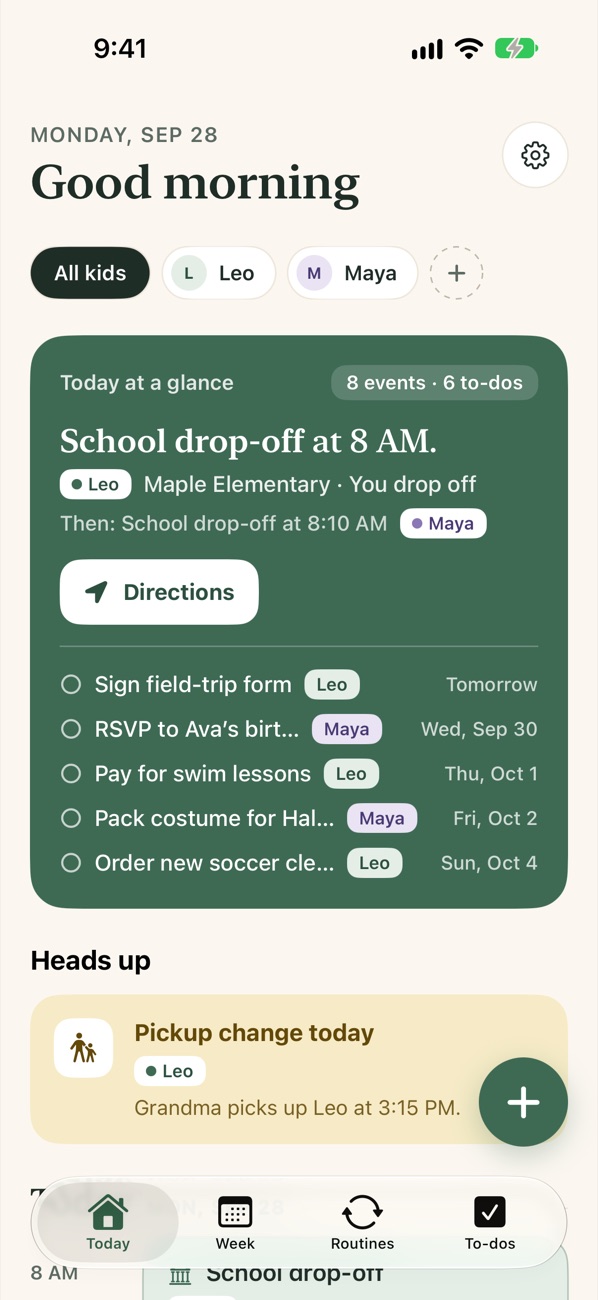
One timeline for all your kids, each in their own color. "Today at a glance" shows what's next, and once the day is done it moves on to tomorrow.
TodayKid colorsTomorrow -
Plan the week’s driving
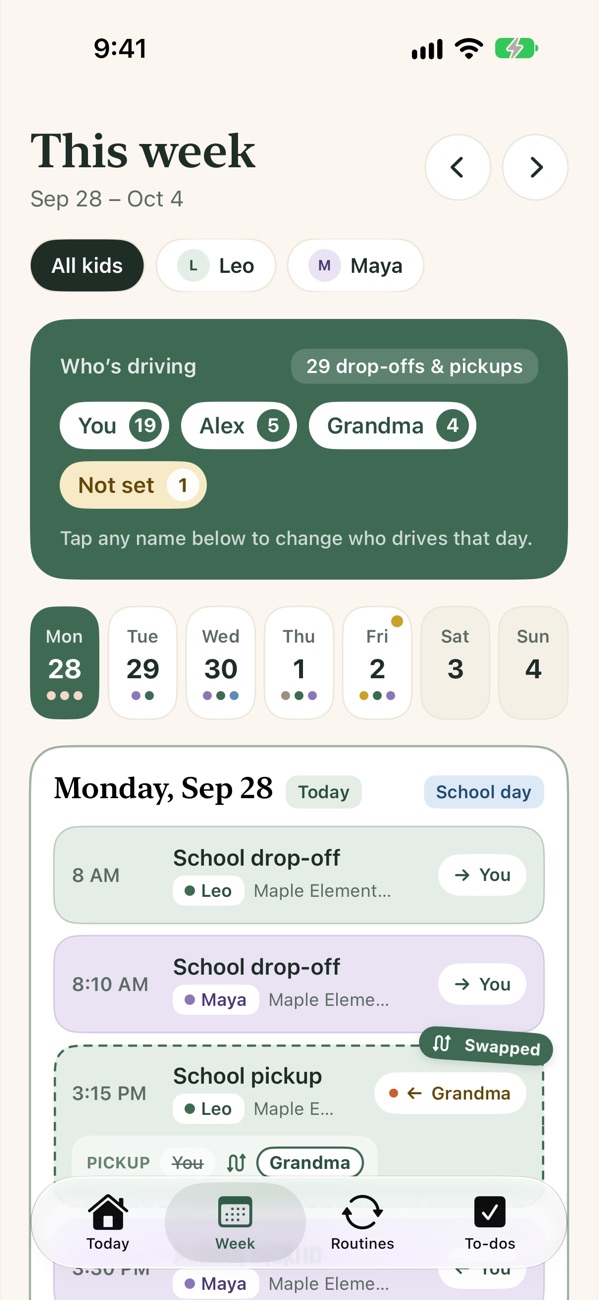
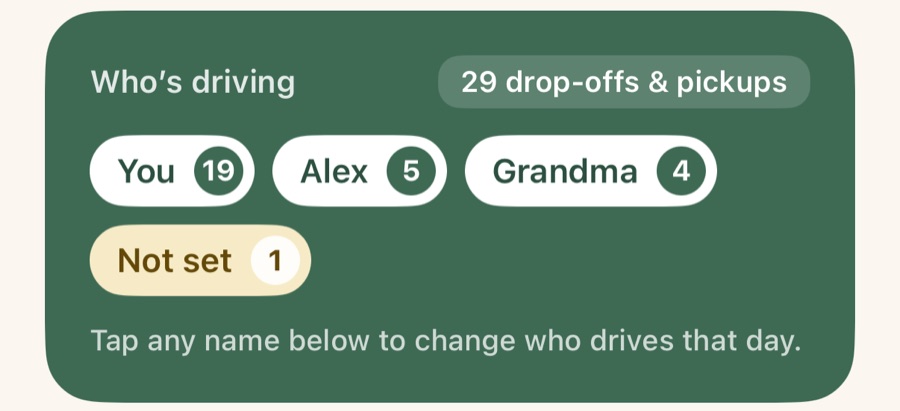
The Week tab lists every drop-off and pickup with who's driving, and counts how the driving is split, so you can sort out the week ahead of time.
WeekWho’s driving -
One-day swaps
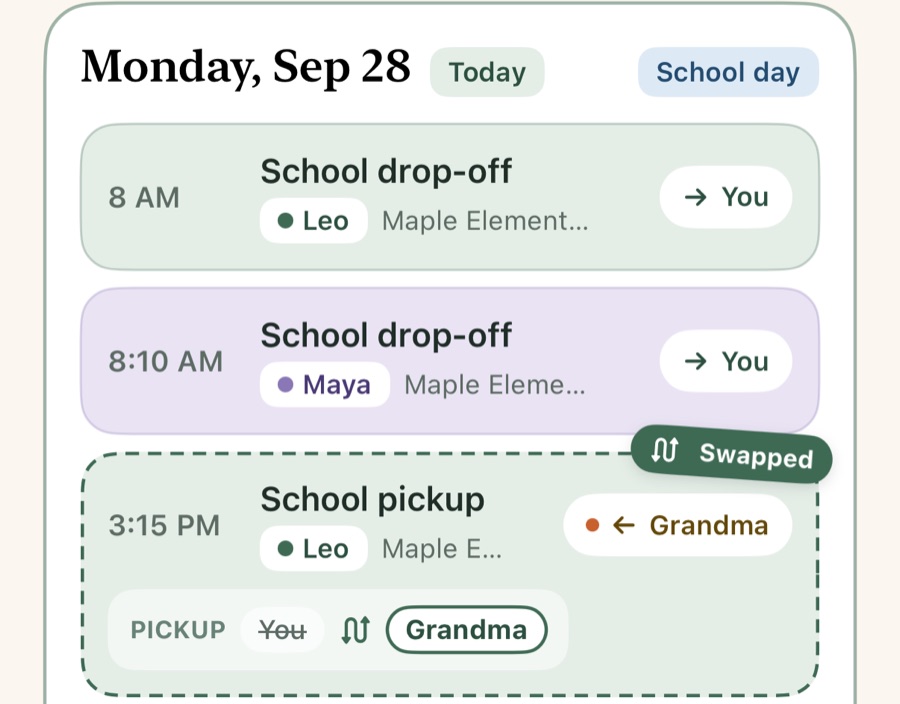
Set the usual driver for each weekday, for school and for activities. Tap a name to hand off just one day, and the swap is marked right on the card.
Drop-offsPickupsSwapped -
Traffic-aware leave times
Live drive times from Apple Maps tell you when to leave for drop-offs, pickups and activities. The leave-now alert goes only to whoever is driving.
Live trafficLeave-by alerts -
Routines that repeat themselves
Singapore Math on Mondays, piano on Wednesdays, library books on Fridays. Set them once with a place and drivers, and skip a day when plans change.
WeeklySkip a day -
School calendar, imported
Pick your school district or paste its calendar link. No-school days, breaks and early releases land in your plan, and it checks for updates every week.
District listiCalWeb pages -
Quick add in plain English
Type "Cancel next week's swimming class" or "Dentist for Leo Oct 12 at 3pm." KidSched finds the child, the routine and the date.
To-dosEvents -
Heads-ups & reminders
Pickup changes, no-school days, early releases and rain on the way show up as heads-ups, with a night-before checklist and to-do reminders.
Heads upNight beforeWeather -
Home & Lock Screen widgets
"Today at a glance" shows what's next and your to-dos without opening the app. It updates as the day goes on, then switches to tomorrow.
SmallMediumLargeLock Screen
Know who’s driving, all week long
Every drop-off and pickup for the week in one list, each with the driver’s name. Spot a clash on Sunday night, not at 3 pm on Wednesday.
- See how the driving is split between you, your partner, grandparents and friends
- Tap a name to swap just that day. The card is marked “Swapped” and shows who it was.
- Works for school and for activities, drop-off and pickup
Just type it the way you'd say it
No forms to fill in. KidSched reads your sentence, picks the right child and routine, and works out the date.
- Understands "tomorrow," "next week" and "Oct 12"
- Canceling a class hides it from your plan. Delete the to-do and it's back.
- Add a time and it becomes an event, with saved places for the address
The whole school year, from one link
Pick your school district from the list, or paste an iCal or webcal feed or just the calendar web page. KidSched sorts every date, and you choose what shows up.
- No-school days, breaks, early release and key dates
- Set the early-release pickup time once and those days' pickups move automatically
- Checked weekly, so changes to the calendar show up automatically
Your family's data stays yours
No account and no servers of ours. KidSched keeps your kids' schedules on your iPhone.
Stored on your iPhone
Children, routines, to-dos and places live in a database on your device. There's no login and no tracking.
End-to-end encrypted sharing
Want both parents in sync? Family sharing uses your own iCloud, and names, addresses, notes and allergies are encrypted so Apple can't read them.
Stop sharing anytime
Turn sharing off and the family data is removed from iCloud while everything stays on your phone. The other parent keeps a copy too.
Calmer mornings are coming soon
KidSched is almost ready for the App Store. Send us a note and we'll let you know the day it launches.